New: Product images in autoscan
Our scanning solution now displays product images, enabling visual verification.
It happens again and again: the article number on the label is correct, the quantity is correct – and yet you receive the wrong item in goods receipt.
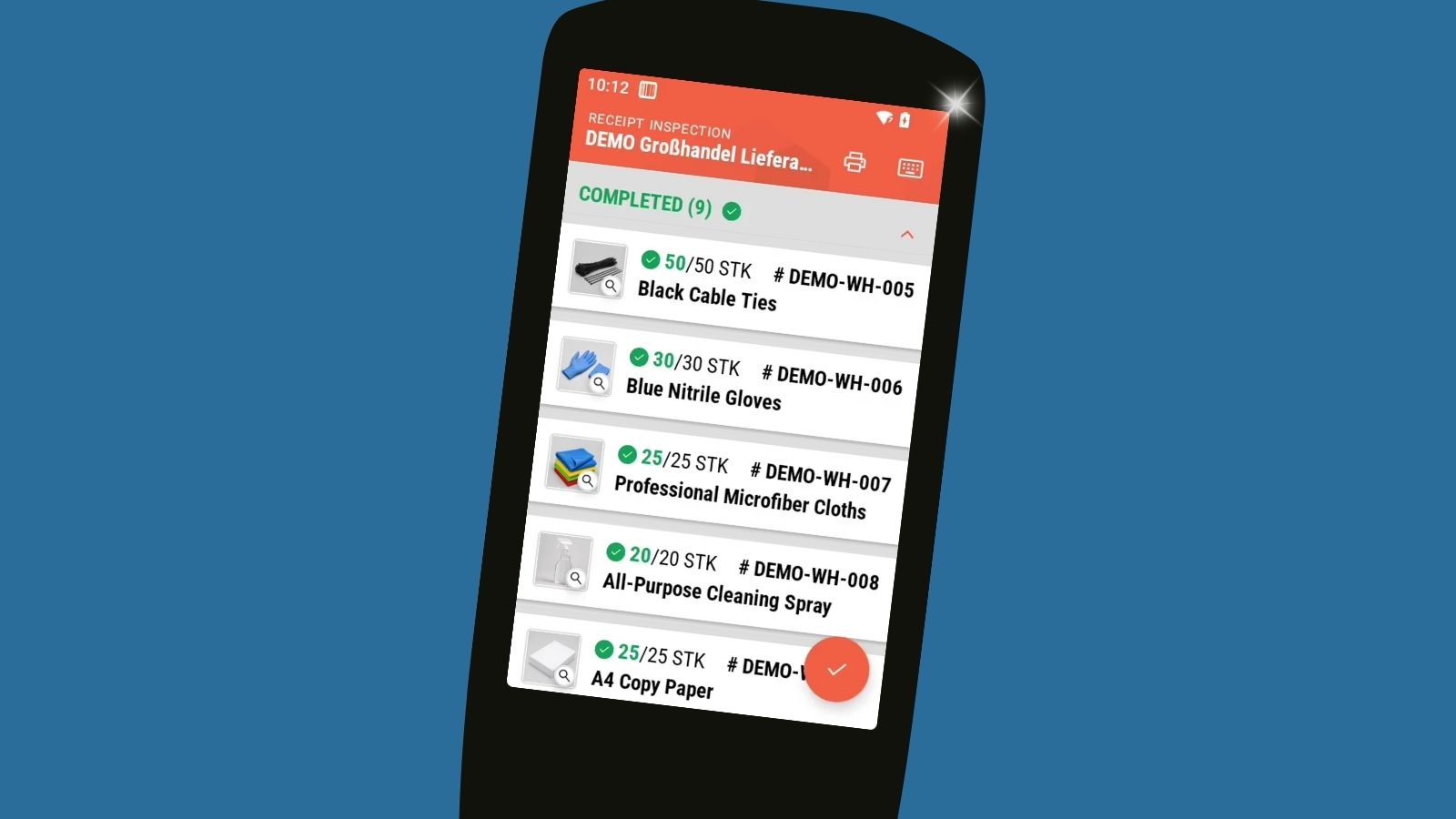
To catch this in time, we've extended autoscan with a new feature: whenever a product image is stored in a connected ERP system like Business Central, autoscan will now display it automatically.
This allows you to verify items visually and ensure that the right product lands in your warehouse!
Product image display across all autoscan features
The new feature isn't limited to goods receipt. You can use it wherever an additional visual check is helpful – from inventory counts to packing shipments.
What does the new feature look like in autoscan?
Once a product image is stored in your ERP system, it appears automatically in autoscan. You'll see a thumbnail in both list view and on the detail page.
To examine the image more closely, you can open it in fullscreen mode – either by tapping the image on screen or by pressing the P1 button on our AUTOID 10 scanner. You can also zoom in to view details.
Got questions? We're happy to help!
Want to know more about this new feature or autoscan in general? Get in touch!
Send us a message at hello@autoscan.app – or book a demo meeting to see autoscan in action.