
GET MORE OUT OF YOUR ERP
You already run Business Central. So why is your warehouse still running on pen and paper?
Paper lists, delayed postings and manual checks cost working time and increase the risk of errors. Yet Business Central already gives you everything you need for end-to-end digital warehouse processes.
autoscan closes this gap. No complex IT project required.
Proven in everyday warehouse work around the world.
38
Countries
2,200+
Users
100,000
Scans per day
THE DIFFERENCE ON THE WAREHOUSE FLOOR
Does this sound familiar?
What changes in your warehouse with autoscan.
IN YOUR WAREHOUSE TODAY
Everything is entered twice.
First on paper or the delivery note, then once again at the PC in Business Central.
WITH AUTOSCAN
Capture once. Skip the double work.
Capture data on a mobile device and post it straight to Business Central. No more retyping.
IN YOUR WAREHOUSE TODAY
Wrong item, wrong quantity.
Typos and transposed digits often go unnoticed until the physical inventory. Or until the customer spots them.
WITH AUTOSCAN
Fewer entry errors. Less rework.
Identify items by scanning and record quantities digitally instead of reading and typing them.
IN YOUR WAREHOUSE TODAY
Stock levels lag a day behind.
Postings happen at the end of the shift. Until then, sales and purchasing plan with outdated figures.
WITH AUTOSCAN
Current stock levels instead of delayed postings.
Record goods movements right at the shelf and have them processed in Business Central without delay.
IN YOUR WAREHOUSE TODAY
Stocktaking brings the warehouse to a halt.
Print count sheets, count, type up the results and then hunt for discrepancies.
WITH AUTOSCAN
Less paperwork for your physical inventory.
Scan the item, enter the quantity, done. Your stocktaking results go straight into Business Central.
AUTOSCAN IN ACTION
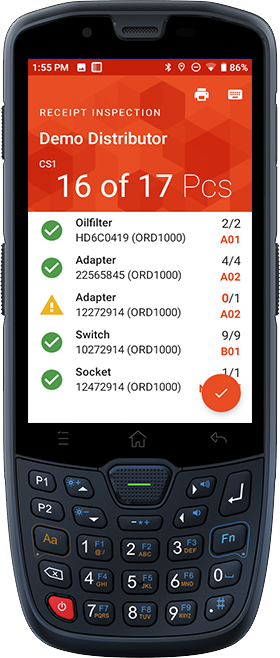
One scan. And Business Central is up to date.
EASY TO IMPLEMENT
Go digital without starting a digitalization project.
A ready-made scanner solution for Business Central that makes warehouse digitization simple. No costly in-house development.
Ready to use, not costly to build.
No need to develop or maintain a scanner solution of your own. autoscan is a ready-made solution for Business Central and saves you development effort.
Installed in a single session.
We carry out the installation together with you in one session. No months-long IT project required.
Personal support.
We review your ERP and warehouse configuration, fine-tune the processes and set up autoscan. With a dedicated contact person.
On your devices.
autoscan runs on a wide range of compatible Android devices, from smartphones to rugged warehouse scanners.
Your ERP is ready. Now take your warehouse processes digital, too.
See in a personal demo how much potential your existing processes hold.
Book a demoPick a time that suits you online
GOOD TO KNOW
Frequently asked questions about autoscan
How much does autoscan cost?
autoscan is licensed per device per month. There are no one-time fees, and licenses can be cancelled at any time. The more devices you use, the lower the price per license.
Does autoscan work with Business Central Online and on-premises?
autoscan works with both Microsoft Dynamics 365 Business Central Online and Business Central on-premises. Find out more about the integration on our page Mobile scanner for Microsoft Dynamics 365 Business Central.
How much effort does it take to introduce autoscan in Business Central?
autoscan is a plug-and-play solution for Microsoft Dynamics 365 Business Central. No custom development is needed. We carry out the installation together with you in one session, which takes between 30 and 120 minutes. We then review your ERP and warehouse configuration, fine-tune the processes and make the necessary settings. A dedicated autoscan contact person supports you throughout.
Do we need our Business Central partner for the rollout?
autoscan can be introduced without your ERP partner. All you need is someone who knows your Business Central environment and has the required permissions. That can be your in-house IT team, the person responsible for your ERP, or your external BC partner.
Which scanners and devices can we use?
autoscan runs on most Android devices, from smartphones to professional warehouse scanners. It requires Android 5 or later, and we recommend Android 9 or higher. The device also needs an ARM-based processor and must support Google Mobile Services, in particular Google Play services. To communicate with the autoscan service, it needs a network connection via Wi-Fi or mobile data. If you want to connect Zebra ZQ210 mobile printers, Bluetooth LE is also required. We are happy to check with you whether your existing devices are suitable. You can find suitable devices under The scanner for all warehouse processes.
Does autoscan work without full Wi-Fi coverage in the warehouse?
autoscan also works with patchy Wi-Fi. The device needs an internet connection to open a document. After that, you can keep working in areas without reception, because autoscan stores your entries on the device until the connection is back. To complete the document and post it in Business Central, the device has to be back online.
How quickly can employees get started with autoscan?
autoscan is built for everyday warehouse work. During development, we spent many hours in warehouses ourselves. That is why the interface is modern, clear and designed around real-world workflows. autoscan is multilingual, so your employees can work in their own language.
Can we try autoscan before we commit?
autoscan starts with a personal demo. We show you how it works and discuss specific use cases in your warehouse. If you then want to try autoscan yourself, you can run it in test mode in a Business Central sandbox.